Connectivity
To use ExpeDat for transferring files between computers, the computers must be connected by an Internet Protocol (IP) network path. That is, each computer must have a valid IP address and be reachable by the others. The remote system must be running the servedat server. Your local workstation must have an ExpeDat client.
If there are firewalls, VPNs, or NAT devices between the computers, then these devices must be configured to allow traffic on UDP/IP port 8080. You can also configure ExpeDat to use any other UDP/IP port number, if that is more convenient.
If you are considering use of a network emulator, see Tech Note 0022 for important information about emulators.
Should you experience difficulty with a network device, consult the Troubleshooting chapter, or refer to DEI Tech Note 0002 for information about configuring firewalls.
In most environments, it is not necessary to open ports on the client-side firewall.
Changing the Port
The ExpeDat server can be configured to listen for clients on any available UDP/IP port number. Changing the server's port may be desirable if UDP/IP 8080 is already in use by another application, or if its use is restricted by firewall or administrative rules.
The servedat listen port is set using the Port configuration variable. See the Configuration File section for instructions on setting configuration variables.
If you change a server's port, then clients will need to specify the new port whenever they communicate with that server. In ExpeDat Desktop and DropDat, this is done by following the server name with a colon or plus sign followed by the new port number. For example, "exp.example.com:8100" or "exp.example.com+8100". With the movedat client, use the -p option to specify the port, or the server name followed by a plus sign and the new port.
Windows Firewall
The Windows firewall can be very aggressive about both blocking applications and degrading their performance. Extra steps may be required to ensure that ExpeDat data is allowed to pass through unhindered.
When installing the ExpeDat server, it will attempt to detect firewall problems and display warnings during installation. When "Run as Administrator", the server will attempt to correct problems it finds. However, it is still a good idea to manually review your firewall settings to ensure that the ExpeDat port is open and that there are no block rules applying to it or the ExpeDat applications.
When running any ExpeDat software for the first time, you may see a dialog box similar to the one below. At a minimum, you must click "Allow access" or "Unblock" for the software to function correctly.
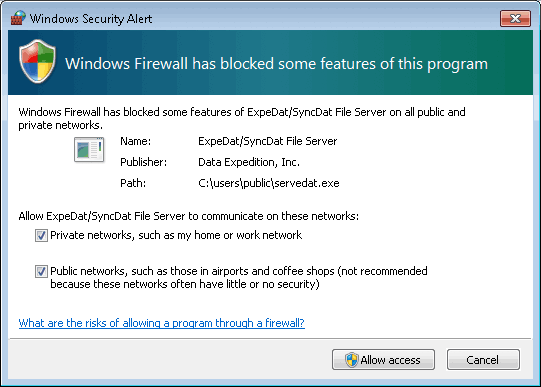
If you take any action other than clicking "Allow access", then the application may be forever blocked. Even if you later add a rule to allow the application, it may still be blocked. You may need to manually remove the original block rules from the firewall. To do this, use the "Advanced settings" link in the Windows Firewall control panel and examine both "Incoming Rules" and "Outbound Rules".
Third-party firewall, anti-virus, and security software for Windows may also severely degrade network performance. Make sure to white-list all ExpeDat applications and traffic on UDP port 8080 (or the port configured for your server). If you are experiencing slow performance, try disabling third-party software to test if performance improves.