Multitasking
While a file is transferring, you may continue to browse, perform maintenance operations, and request additional transfers. You can even change servers and authentication without disrupting the transfer in progress.
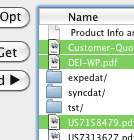
You may select multiple files to Get or Send in the browsers. The transfers will be completed in the order they were selected. Each time you click Get or Send, the selected files will be added to the transfer queue.
If you select a folder, its entire contents will be queued for transfer. See Copying Folders for details.
If you choose to transfer an entire folder and do not have Streaming Folders enabled, a transaction will be queued for each of its enclosed files. This may result in many thousands of transfers being queued at once. Streaming Folders is recommended when transferring folders containing large numbers of files.
If multiple actions require your input at the same time, their prompt dialogs will be displayed in the order the actions occurred. For example, if an expedat:// URL requiring authentication is clicked while you are creating a new folder, the web-link will be processed only after you finish the naming the new folder.
See the Canceling section for how to pause or stop a series of queued transfers.